
+- Jellyfin Forum (https://forum.jellyfin.org)
+-- Forum: Support (https://forum.jellyfin.org/f-support)
+--- Forum: General Questions (https://forum.jellyfin.org/f-general-questions)
+--- Thread: constant 100% CPU usage (/t-constant-100-cpu-usage)
constant 100% CPU usage - bitarco - 2025-11-13
hope you are doing well.
I am writing to request assistance regarding an issue I encountered after upgrading my Jellyfin server from version 10.10.7 to version 10.11.2.
After performing the upgrade, my server began experiencing constant 100% CPU usage, even when no streaming activity was happening. Additionally, all video playback started to force transcoding for every client, even for files that normally direct-play without any problem.
When running Jellyfin 10.10.7, everything works perfectly:
- CPU usage is normal.
- All compatible videos are direct-played correctly.
- GPU transcoding works without issues (when needed).
- Overall system is stable.
I tried multiple steps, including:
- Restarting the service
- Clearing cache and metadata
- Checking ffmpeg/NVENC support
- Reviewing logs
I would appreciate your guidance on:
- Whether this is a known bug in version 10.11.2
- Any configuration changes required after upgrading
- Possible fixes or patches
- Recommended upgrade procedure from 10.10.7 → 10.11.2
- How to prevent forced transcoding on the new version
Please let me know if you need logs, system details, or other diagnostics — I am happy to provide them.
Best regards,
RE: constant 100% CPU usage - Adam Haeffele - 2025-11-13
I had the same exact problem. It wouldn't utilize my GPU and live streams were taking about 33% of my CPU each. I have an i7 11th gen CPU. I had to downgrade (which did not go well). I will definitely be following this post.
RE: constant 100% CPU usage - bitarco - 2025-11-14
(2025-11-13, 08:08 PM)Adam Haeffele Wrote: I had the same exact problem. It wouldn't utilize my GPU and live streams were taking about 33% of my CPU each. I have an i7 11th gen CPU. I had to downgrade (which did not go well). I will definitely be following this post.
same for me i do downgrade to 10.10.7 again
Processor: Intel® Core™ i9-14900K (32 CPUs), ~3.2GHz
RE: constant 100% CPU usage - dodgerbluee - 2025-11-15
I've been seeing the same issue. I think I upgraded on 11/5
Intel iGPU 12th Gen Intel® Core™ i7-12700K
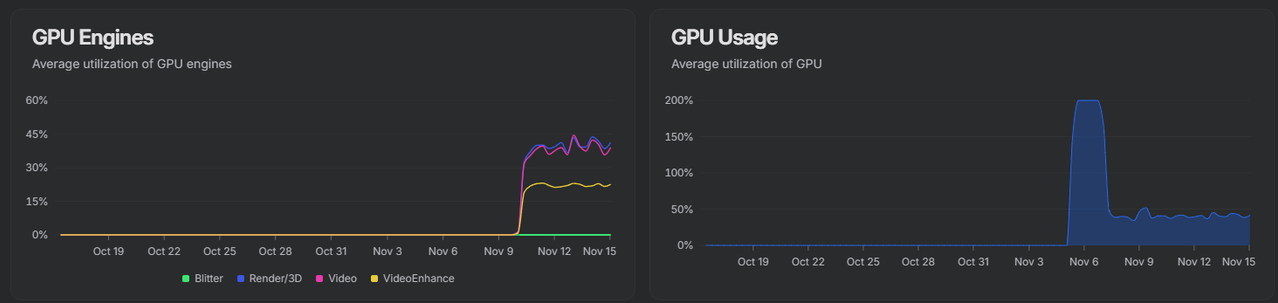
Streaming single stream of Invincible in 1080p

RE: constant 100% CPU usage - 4r5hw45twh - 2025-11-15
You'd think these things are tested first. Also, this is a good reason to never upgrade until needed.
RE: constant 100% CPU usage - bandit8623 - 2025-12-06
this has been an issue for me since .2 . still random 100%cpu usage on.4 all i have active is live tv and no backround media scans and still 100% cpu usage with noone watching anything.
RE: constant 100% CPU usage - haha - 2026-05-31
I had similar issue when while idle (no streaming) the cpu usage was 100%, task ffmpeg was using all of it. I went to jellyfin -> Dashboard -> Planned tasks and saw that the Trickplay was running for few hours. I stopped it and the cpu usage dropped to idle numbers.
I also went to Dashboard → Playback → Trickplay and saw that I didn't have hardware acceleration enabled. After I enabled it and run the task again the task was using way less cpu and work was moved to GPU.
Try checking if the Generate Trickplay images task is the root cause.
RE: constant 100% CPU usage - bandit8623 - 2026-05-31
(2026-05-31, 11:22 AM)haha Wrote: I had similar issue when while idle (no streaming) the cpu usage was 100%, task ffmpeg was using all of it. I went to jellyfin -> Dashboard -> Planned tasks and saw that the Trickplay was running for few hours. I stopped it and the cpu usage dropped to idle numbers.
I also went to Dashboard → Playback → Trickplay and saw that I didn't have hardware acceleration enabled. After I enabled it and run the task again the task was using way less cpu and work was moved to GPU.
Try checking if the Generate Trickplay images task is the root cause.
I havent had any problems since a few updates ago. forgot to respond to this. i had those features already disabled.