
• Login
  • Register
  • Login Register
    Login
    Username/Email:
    Password:
    Or login with a social network below
  • Forum
  • Website
  • GitHub
  • Status
  • Translation
  • Features
  • Team
  • Rules
  • Help
  • Feeds
User Links
  • Login
  • Register
  • Login Register
    Login
    Username/Email:
    Password:
    Or login with a social network below

    Useful Links Forum Website GitHub Status Translation Features Team Rules Help Feeds
    Jellyfin Forum Support General Questions Library Separation

     
    • 0 Vote(s) - 0 Average

    Library Separation

    coolasice1999
    Offline

    Junior Member

    Posts: 2
    Threads: 1
    Joined: 2026 Nov
    Reputation: 0
    #1
    2026-11-03, 12:54 AM
    Anyone able to help here?   I have two directories of movies, adult and children, and can easily see separation when logged in as the admin, but when a user logs in the libraries are merged into a single Movies group.   How can I maintain the separation for my logged in user?  I do not want to make multiple users with restrictions, just want to be able to isolate each library so we are able to view only adult movies or childrens depending on which library is selected.[Image: jelly.png]
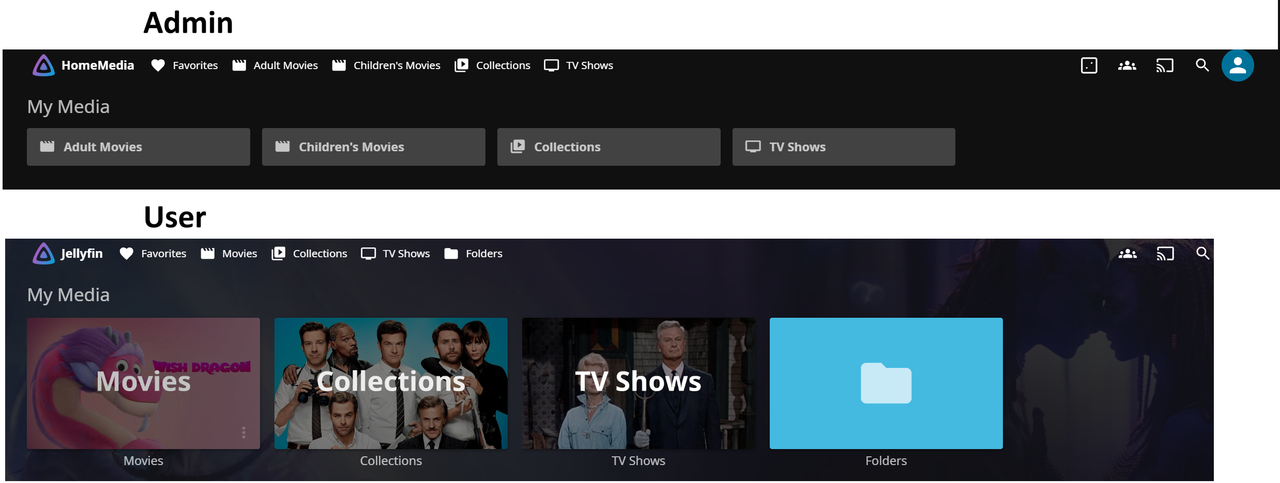
    TheDreadPirate
    Online

    Community Moderator

    Posts: 16,815
    Threads: 12
    Joined: 2023 Jun
    Reputation: 500
    Country:United States
    #2
    2026-11-03, 02:57 PM
    Click on your profile picture > Settings > Home

    Scroll all the way down to the bottom. Under "Library folders" did you check any of those boxes?
    Jellyfin 12.4 (Docker)
    Debian 13 w/Xanmod amd64v3 LTS kernel
    AMD Ryzen 5500 w/32GB DDR4
    Intel Arc A380
    OS drive - SK Hynix P41 1TB
    ZFS Storage pool
        vdev1 - 6x WD Red Pro 6TB CMR in RAIDZ1
        vdev2 - 3x WD Red Pro 18TB CMR in RAIDZ1
    [Image: GitHub%20Sponsors-grey?logo=github]
    coolasice1999
    Offline

    Junior Member

    Posts: 2
    Threads: 1
    Joined: 2026 Nov
    Reputation: 0
    #3
    2026-11-03, 09:22 PM
    That was the exact problem!  Thanks so much!

    (2026-11-03, 02:57 PM)TheDreadPirate Wrote: Click on your profile picture > Settings > Home

    Scroll all the way down to the bottom.  Under "Library folders" did you check any of those boxes?
    « Next Oldest | Next Newest »

    Users browsing this thread: 1 Guest(s)


    • View a Printable Version
    • Subscribe to this thread
    Forum Jump:

    Home · Team · Help · Contact
    © Designed by D&D - Powered by MyBB


    Jellyfin

    The Free Software Media System

    Linear Mode
    Threaded Mode